

What to send to MaxCut Support
MaxCut Installer Log File
Antivirus software details
Short description of what happened
Most important: the MaxCut installer log file
Whenever the MaxCut installer runs, it automatically creates a log file.
This log file gives us a detailed, step-by-step record of what is happening behind the scenes during an installation.
If you send us this log file, it tells us a bunch of useful information to help us diagnose what the problem is. Because of this, the log file is the single most important thing you can send us when experiencing installation issues.
How to find the MaxCut installer log file
The log file is stored in your Windows Temp folder: C:\Users\{your username}\AppData\Temp and is named using this pattern: MaxCut_{year}{month}{day of month}{time of day}.log (for example, a log file named MaxCut_20251219071330.log would be a log file generated at 7:13 am on the 19th of December 2025).
A really quick way to get to the Windows Temp folder is simply by presssing Win + R on your keyboard and pasting the below text. This will open Windows Explorer in the temp folder.
%LOCALAPPDATA%\TempAn alternative way is to open File Explorer. Click in the address bar at the top of the window and type %LOCALAPPDATA%\Temp and press Enter.
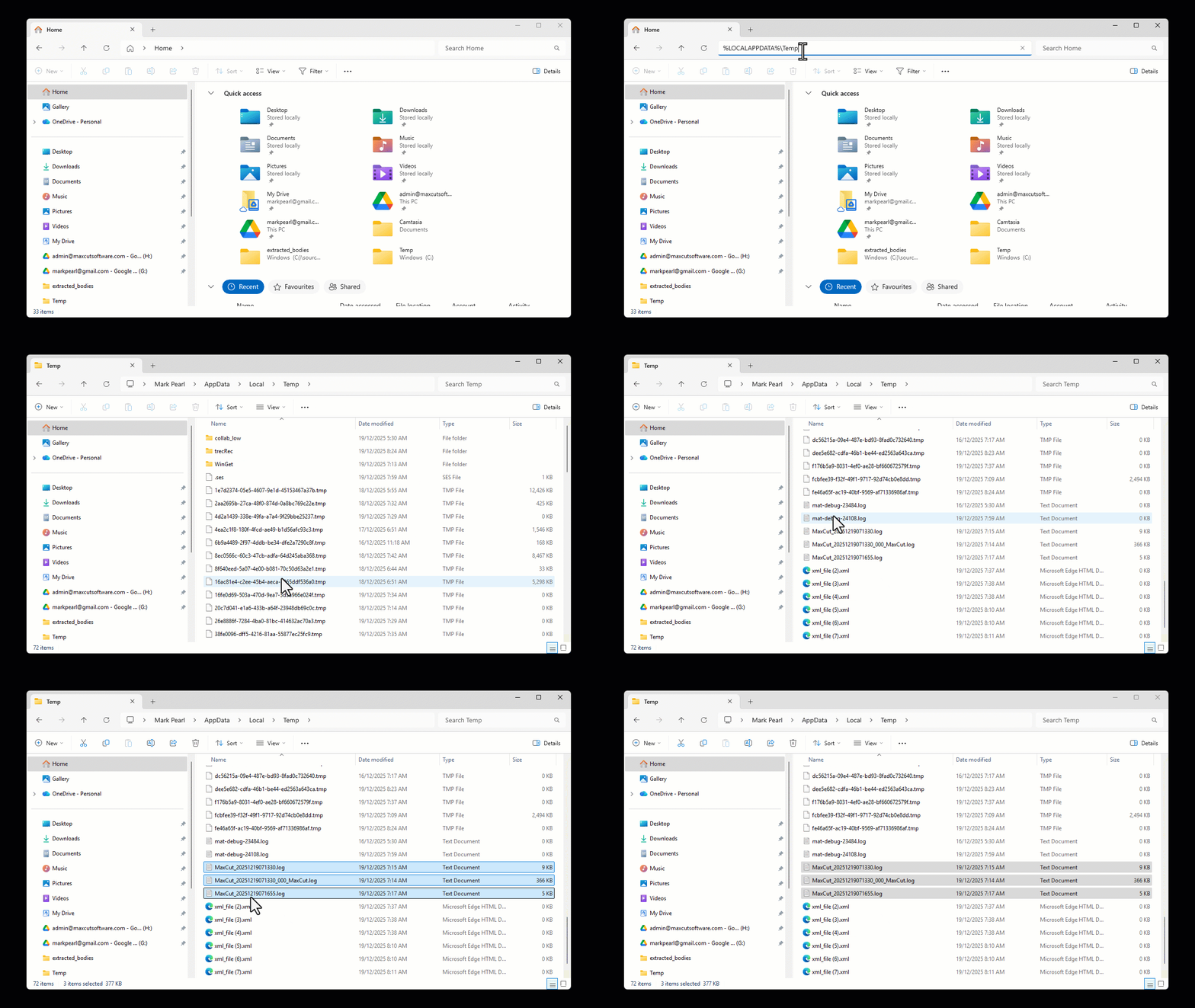
Once you are in the Temp Folder, click in the search box (top-right corner).
Type: MaxCut and press Enter.
File Explorer will now show only files with MaxCut in the name.
Press Ctrl + A to select all the MaxCut files in the temp folder and copy them to your support email.
Antivirus software details
Please also tell us:
Whether you have antivirus or security software installed
The name of the product (for example: Windows Defender, Avast, Sophos, Bitdefender, etc.)
Whether it showed any warning, blocked the installer, or quarantined any MaxCut files
Antivirus software is a common cause of installation issues, and this information is not always visible in the log file.
A short description of what happened
A sentence or two is enough, for example:
“The installer starts but stops partway through”
“The installer finishes, but MaxCut won’t open”
“Nothing happens when I double-click the installer”
If you saw an error message, a screenshot is also helpful.