

MaxCut Support Page

Learn how to get the most out of MaxCut with our comprehensive support articles. Find answers to common questions, step-by-step setup guides, and troubleshooting tips.

Training & Tutorials

Holes & Grooving

How to enable and access the holes and grooving fields in MaxCut Business Edition, including where to activate them when adding a panel and where to find more details on specifying holes and grooves.

Last updated on 17 Aug, 2026

To enable the holes and/or grooving fields on a panel you need to be on the "Business Edition" of MaxCut.

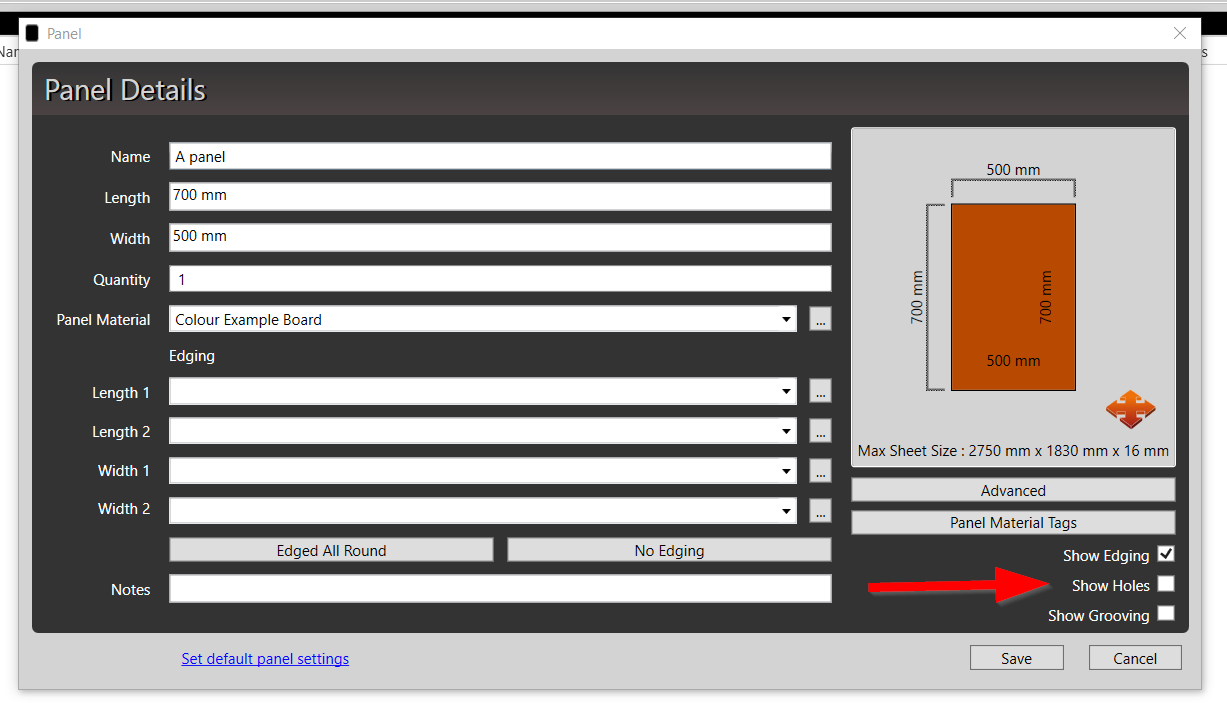
When you add an input panel check the “Show Holes” and “Show Grooving” check boxes in the bottom right of the window.
Image

To specify holes see more information on how to specify holes on a panel

Likewise, to specify grooving see more information on how to specify grooving on a panel

Was this page helpful?
Previous

Making a basic grouped unit

Next