MaxCut Support Page

Learn how to get the most out of MaxCut with our comprehensive support articles. Find answers to common questions, step-by-step setup guides, and troubleshooting tips.

Can I print each part's name on the optimisation diagram?

Frequently Asked Questions

Can I print each part's name on the optimisation diagram?

Last updated on 29 Oct, 2025

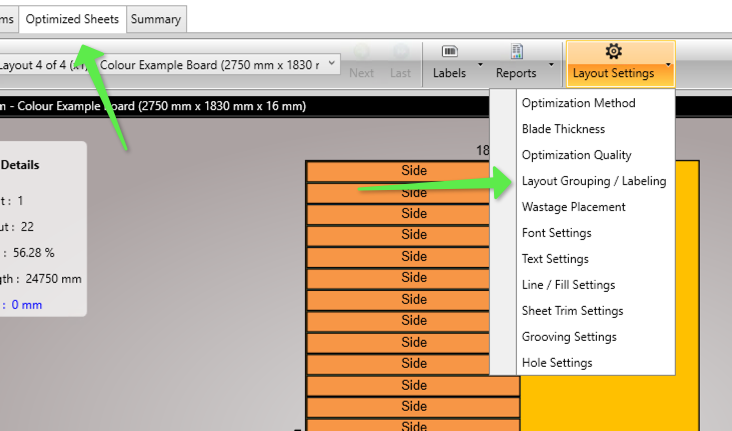
Yes you can. in MaxCut go to Layout Settings > Layout Grouping / Labelling.
Image

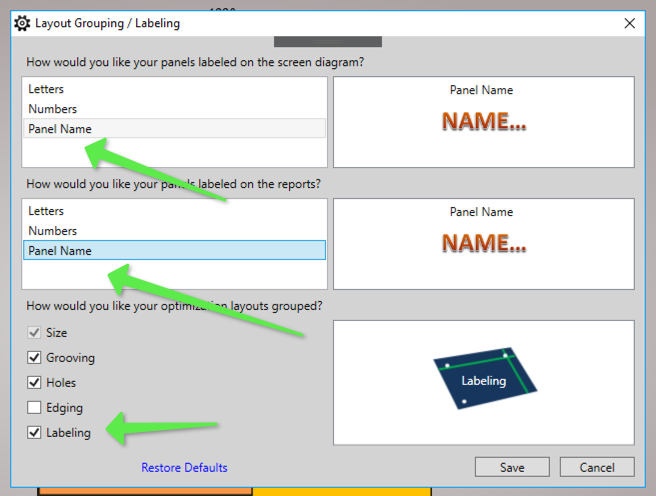
Make sure "Panel Name" is selected for the screen diagrams and "Panel Name" selected for reports.

Then check the "Labelling" checkbox on how you would like the optimisation layouts grouped.
Image

Now when you run an optimisation you should see the name of each part on the optimisation layout and seperate diagrams when the parts are the same size but have different names.

Was this page helpful?
Previous

Can MaxCut do stock/offcut management?

Next